

Live Tracking & WebSocket
Real-time location streaming for authenticated users and public tracking links
Yipii IoT streams real-time vehicle locations over WebSocket using a Pusher-compatible protocol. The IoT backend receives position data from GPS trackers and relays it to connected clients. This guide covers both authenticated fleet tracking and public tracking link integration.
Architecture
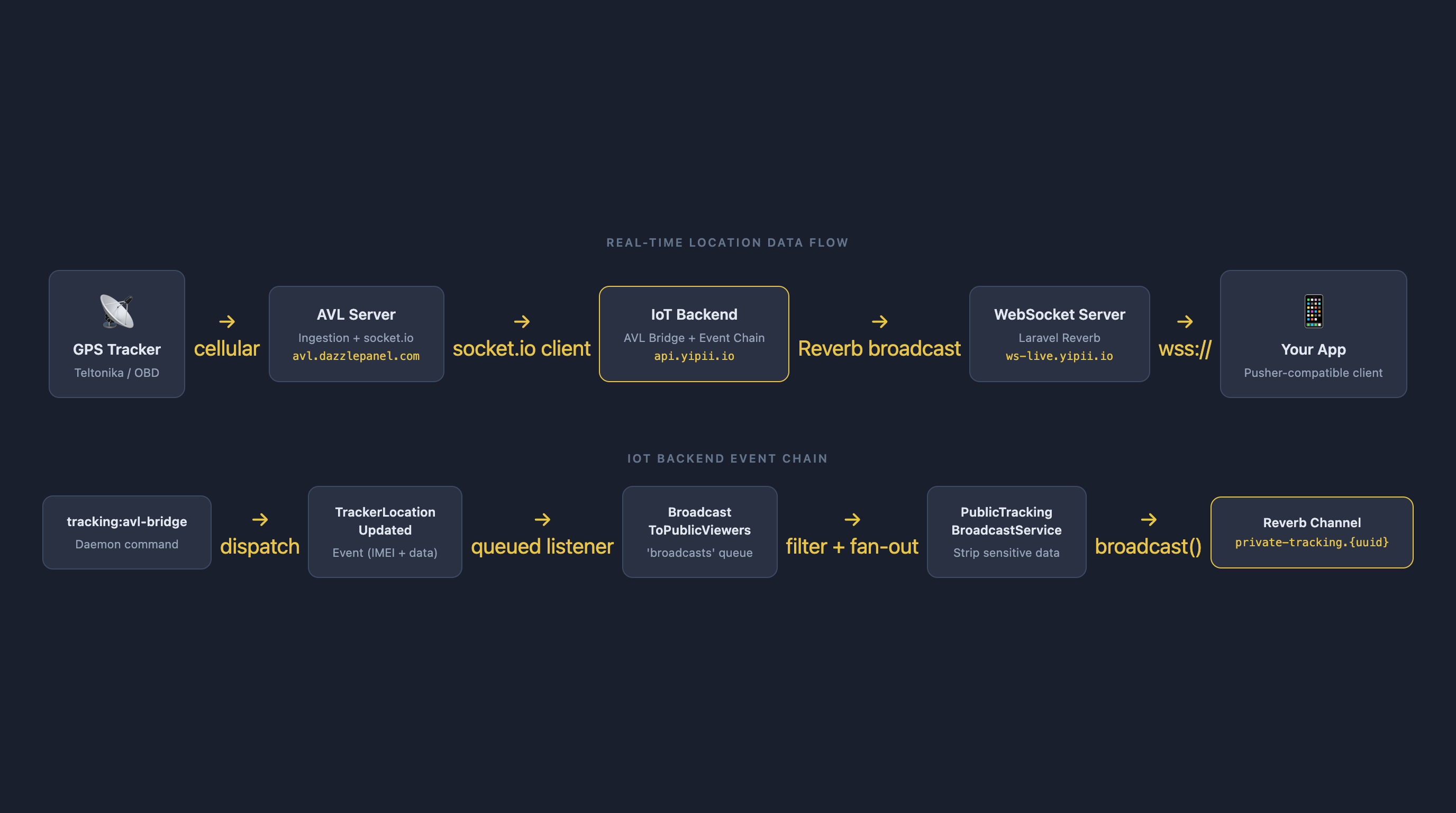
GPS trackers installed in vehicles send position data via cellular to the ingestion server. The IoT backend processes and enriches this data, then broadcasts location events via a Pusher-compatible WebSocket server. Your application subscribes to channels to receive updates in real time.
| Component | URL |
|---|---|
| WebSocket Server | wss://ws-live.yipii.io |
| REST API | https://api.yipii.io |
| Broadcasting Auth | https://api.yipii.io/broadcasting/auth |
Data Flow
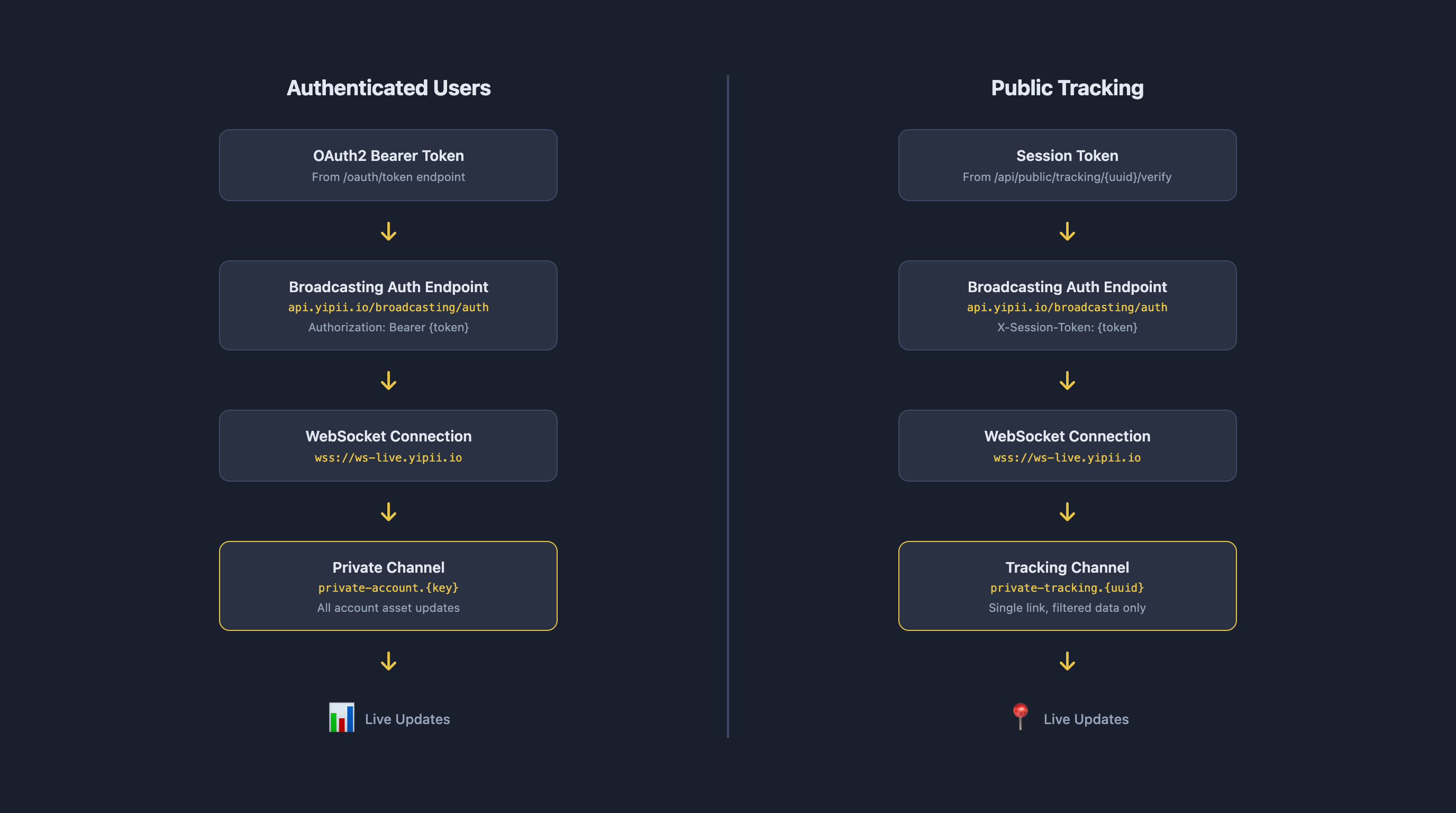
Authenticated Live Stream
For dashboard integrations where you have an OAuth2 access token.
Connection
Connect using any Pusher-compatible client library. The WebSocket server speaks the Pusher protocol.
Authentication
The same OAuth2 Bearer token from the Authentication guide is used. Pass it in the Authorization header. The auth endpoint validates your token and ensures you only receive updates for assets your account has access to.
Subscribe to Asset Updates
Subscribe to a private channel for your account:
Events
| Event | Payload | Description |
|---|---|---|
.location.updated | LocationUpdate or LocationUpdate[] | Position update for assets |
.alert.triggered | AlertData | Geofence, speed, or maintenance alert |
Note the leading dot (.) — required by the server's event naming convention.
Location Update Payload
JavaScript Example
Python Example
Public Tracking WebSocket
For public tracking links where viewers don't have full API credentials. Uses session-based authentication with the same WebSocket server.
Overview
Step 1: Get Link Info
Check the tracking link's access mode and status (no auth required):
Access modes:
| Mode | Verification Required |
|---|---|
public | None — call verify with empty body |
email | Email address |
email_code | Email + 6-digit code (sent via email) |
authorized_only | Whitelisted email address |
Step 2: Verify and Get Session Token
Public mode (no credentials):
Email mode:
Email + code mode (two requests):
Response:
The session token is valid for 4 hours by default.
Step 3: Connect WebSocket
Step 4: Subscribe to Channel
Step 5: Listen for Events
| Event | Description |
|---|---|
.location.updated | Vehicle position changed |
.link.expired | Tracking link expired or disabled |
.schedule.changed | Entered or exited schedule window |
.vehicle.changed | Route-based link reassigned to different vehicle |
Location Event Payload
Note: No internal identifiers (asset_id, IMEI, account info) are exposed. The distance_km and eta_minutes fields are only present when the link has arrival-based expiration configured.
Polling Fallback
If WebSocket is unavailable, poll the location endpoint every 30 seconds:
The response includes asset data with location fields matching the WebSocket payload structure.
Swift (iOS)
Kotlin (Android)
Security
Data Exposed to Public Tracking Viewers
| Exposed | NOT Exposed |
|---|---|
| Position (lat/lng) | IMEI number |
| Speed and heading | Internal device IDs |
| Moving/stopped status | Account information |
| Address (street, town) | Track history |
| ETA and distance to destination | Other assets |
| Display name | Driver personal data |
Session Security
- Session tokens are high-entropy random strings tied to a specific tracking link UUID
- Cross-link protection — a session for link A cannot access link B's channel
- Expiration — sessions expire after a configurable period (default 4 hours)
- TLS required — all connections use WSS (port 443)
- Revocation — disabling a link immediately disconnects all viewers
Access Control for Public Tracking
| Mode | Security Level | Use Case |
|---|---|---|
public | Lowest | Customer delivery tracking |
email | Medium | Known recipients (parents, partners) |
email_code | High | Sensitive cargo, compliance |
authorized_only | Highest | Restricted access (warehouse staff) |
Authenticated Stream Security
- OAuth2 tokens are validated on connection and channel subscription
- The server only sends updates for assets the token's account has access to
- Subscribing to unauthorized channels is rejected
- Token revocation disconnects the client
Scaling & Performance
Subscribe Only to What You Need
Each subscribed asset generates location events every 10-30 seconds when moving. Subscribing to 1,000 assets when you display 10 wastes bandwidth and processing.
Deduplication
GPS trackers may send duplicate positions. Deduplicate by assetId + timestamp:
Reconnection
Pusher clients reconnect automatically with exponential backoff. For public tracking, validate the session before reconnecting:
Rate Limits
Public Tracking:
| Endpoint | Limit |
|---|---|
POST /verify | 30 requests/minute per IP |
GET /location (polling) | 60 requests/minute per session |
| WebSocket connections per IP | 100 |
| Messages per second per channel | 10 |
Typical Update Frequency:
| Vehicle State | Update Interval |
|---|---|
| Moving | Every 10-30 seconds |
| Stopped, ignition on | Every 60 seconds |
| Stopped, ignition off | Every 5-10 minutes |
WebSocket Authentication Errors
| Code | Meaning |
|---|---|
| 4001 | Invalid session token |
| 4002 | Session expired |
| 4003 | Tracking link not found |
| 4004 | Link expired or inactive |
| 4005 | Outside schedule window |
Next Steps
- Live Demo — Interactive sandbox with simulated WebSocket flow
- Reporting Service — Async report generation
- Tracking Links — Creating and managing public tracking links
- IoT-BE API Reference — Full REST API documentation
- Authentication — OAuth2 token setup
Was this page helpful?