

Logging In
Log in to your Yipii IoT dashboard on desktop or mobile. Install the PWA for quick access to real-time fleet tracking.
Logging In
Access your Yipii IoT fleet tracking dashboard from any modern web browser — on desktop, tablet, or phone. There's no app to download; just open the website, sign in, and you're connected to your fleet in seconds.
Login Page Layout
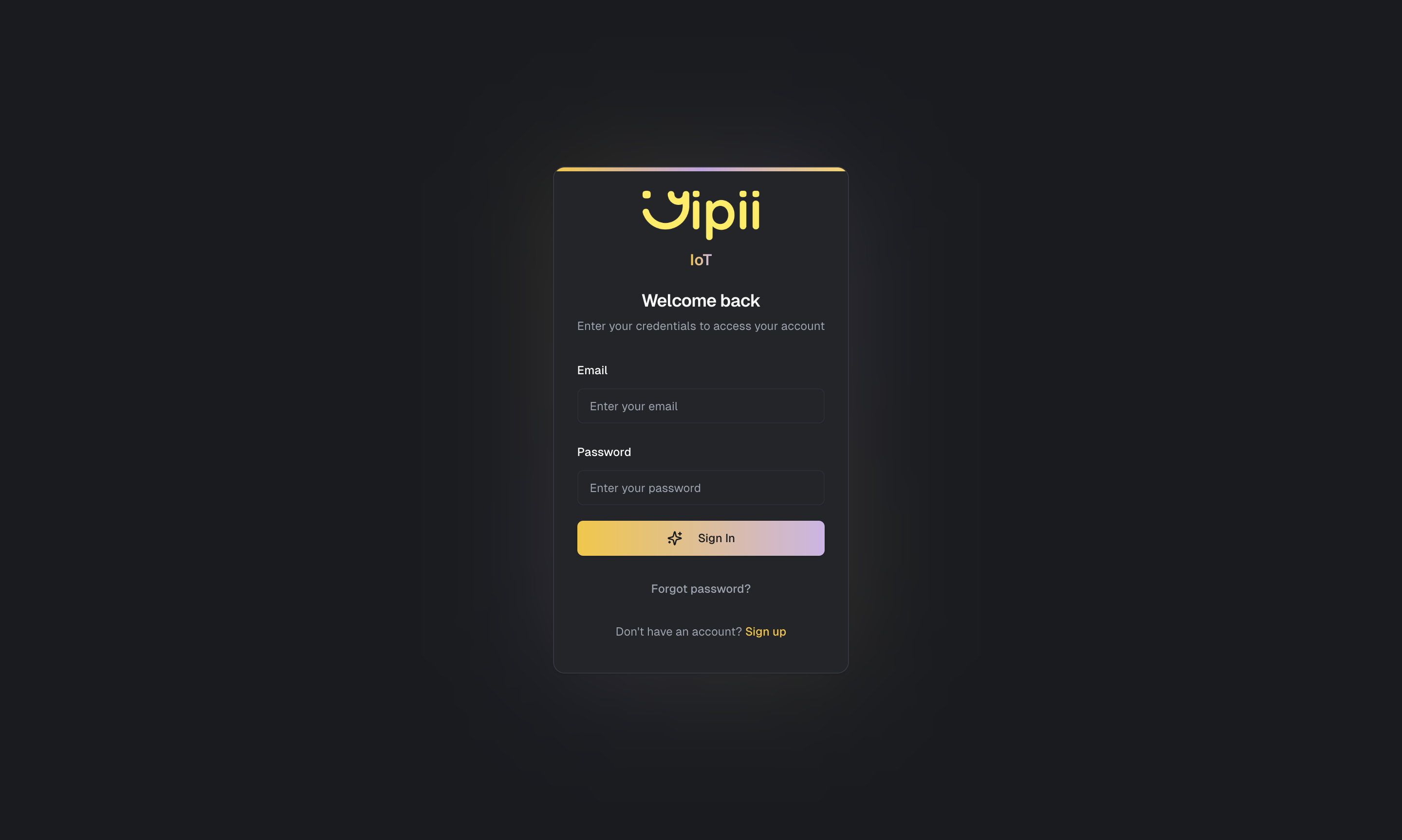
When you visit iot.yipii.io, the login page presents the following:
- The Yipii logo with the IoT label at the top
- A "Welcome back" heading
- A Continue with Google button for single sign-on
- An "OR CONTINUE WITH EMAIL" divider
- Email and Password fields (the password field includes a show/hide toggle via an eye icon)
- A Sign In button
- Links for Forgot password? and Sign in with email link
- A "Don't have an account? Sign up" link at the bottom
- On supported browsers, an "Install the app" PWA banner appears at the bottom of the page
Sign In with Email and Password
To log in with your email and password:
- Go to iot.yipii.io
- Enter your email address
- Enter your password (use the eye icon to toggle password visibility if needed)
- Click Sign In
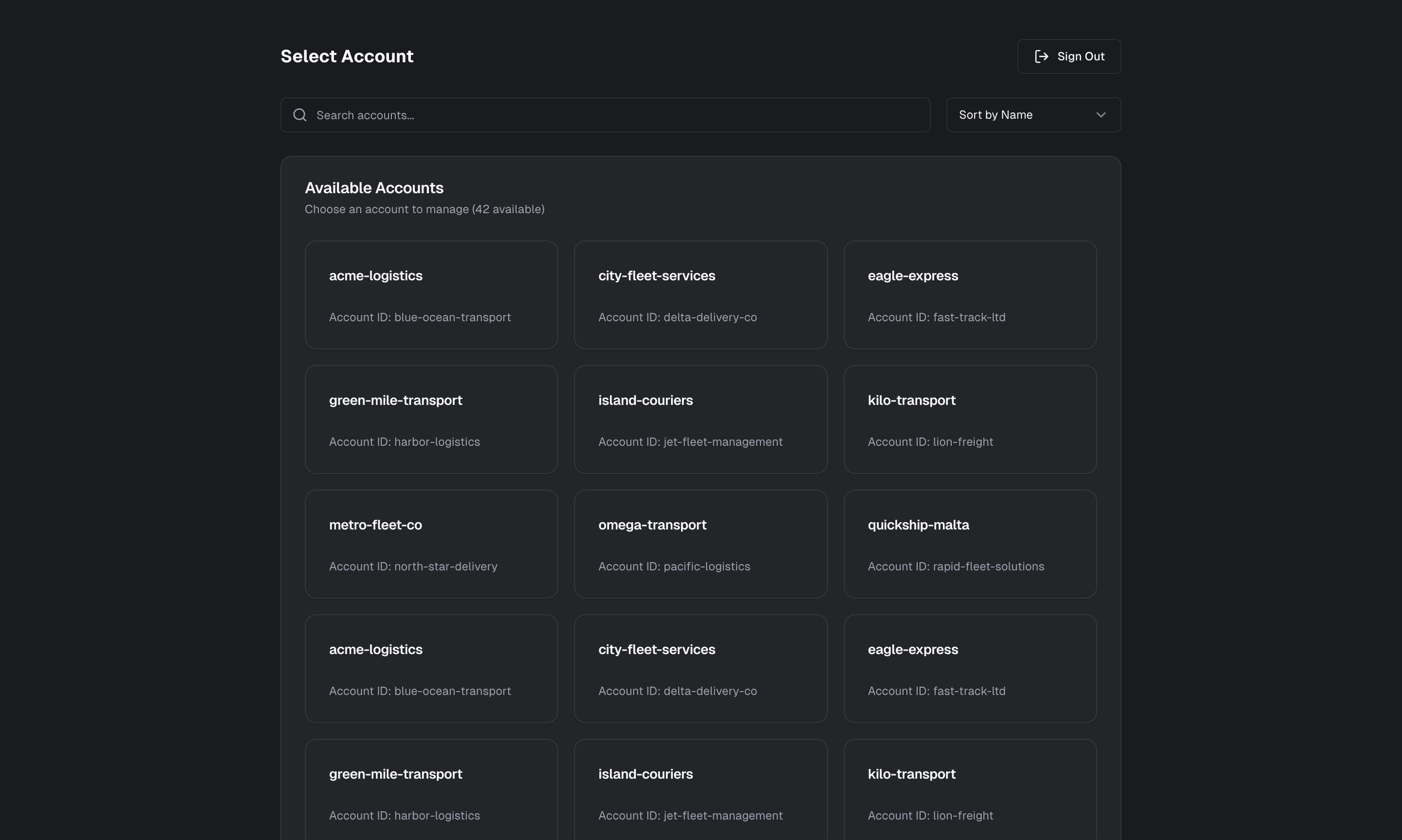
You'll land on the Account Selection page where you choose which fleet account to access. From there, the Operations view opens with the live map showing your fleet in real time.
Sign In with Google
If your account is linked to Google, you can skip the email and password fields entirely:
- Go to iot.yipii.io
- Click Continue with Google
- Select your Google account and authorize access
You'll be signed in and taken to the Account Selection page.
Sign In with Email Link (Magic Link)
If you prefer not to use a password, you can sign in with a one-time email link:
- Go to iot.yipii.io
- Click Sign in with email link below the Sign In button
- On the magic link page, enter your email address
- Check your inbox for a login link from Yipii
- Click the link in the email to sign in instantly — no password needed
The magic link is single-use and expires after a short period. If the link expires, return to the magic link page and request a new one.
Account Selection
After signing in, you'll see a list of accounts you have access to. Click on an account to enter its Operations view. If you only have one account, you may be redirected automatically.
Mobile App (PWA)
Yipii IoT is a Progressive Web App (PWA), which means you can install it directly to your phone's home screen without going through an app store. The PWA looks and feels like a native app — it has its own icon, opens in full screen, and loads quickly even on slower connections.
On supported browsers, you may also see an "Install the app" banner at the bottom of the login page prompting you to install.
Install on iOS (Safari)
- Open iot.yipii.io in Safari (this only works in Safari on iOS)
- Tap the Share button (the square with an upward arrow)
- Scroll down and tap Add to Home Screen
- Tap Add to confirm
The Yipii IoT icon will appear on your home screen. Tap it to launch the app directly — no need to open Safari first.
Install on Android (Chrome)
- Open iot.yipii.io in Chrome
- Tap the three-dot menu in the top right
- Tap Install app or Add to Home Screen
- Tap Install to confirm
Once installed, Yipii IoT appears in your app drawer alongside your other applications.
Why Use the PWA?
The PWA gives you the convenience of a native app without the download. It's always up to date (no manual app updates), uses less storage than a traditional app, and provides push notification support for alerts. Fleet managers and drivers who check vehicle positions throughout the day find the PWA particularly useful for quick access.
Supported Browsers
Yipii IoT works on all modern browsers:
- Chrome (version 90+) — recommended for the best experience
- Safari (version 15+) — required for PWA installation on iOS
- Firefox (version 90+)
- Edge (version 90+)
JavaScript must be enabled. We recommend keeping your browser up to date for the best performance and security.
Staying Logged In
Your session remains active for 30 days, so you won't need to sign in every time you open the platform. If you're on a shared or public computer, log out when you're finished to protect your account.
Trouble Logging In?
If you can't access your account:
- Forgot your password? — Use the Forgot Password page to reset it via email. You can also access this from the Forgot password? link on the login page.
- Don't want to use a password? — Try the Sign in with email link option for passwordless login
- Account locked? — After multiple failed login attempts, your account may be temporarily locked for security. Wait 15 minutes and try again, or contact support@yipii.com
- New user? — If your organization uses Yipii IoT but you don't have an account, ask your admin to send you an invitation through User Management
What's Next?
- Dashboard — Your fleet overview with real-time statistics and charts
- Live Map — See every vehicle on an interactive map
- Signing Up — Create a new account if you don't have one yet
- Account Settings — Update your profile, preferences, and security settings
Frequently Asked Questions
Can I stay logged in permanently?
Sessions last 30 days by default. After that, you'll be asked to sign in again for security. On personal devices where you're the only user, this means you'll rarely need to log in more than once a month.
Does Yipii IoT work on my phone?
Yes. Yipii IoT is fully responsive and works on any phone or tablet with a modern web browser. For the best experience, install the PWA on your home screen — it provides full-screen access and faster loading.
Can I use Yipii IoT on multiple devices at the same time?
Yes. You can be logged in on your desktop computer, phone, and tablet simultaneously. All devices show the same real-time data, and changes made on one device (like creating an alert) are immediately visible on the others.
What is the difference between "Forgot password" and "Sign in with email link"?
Forgot password lets you reset your password to a new one — use it when you've lost or forgotten your password and want to set a replacement. Sign in with email link is a passwordless login method that sends a one-time link to your inbox, letting you sign in without entering any password at all. You can use the email link option any time, not just when you've forgotten your password.
Was this page helpful?