

Reporting Service
Generate reports asynchronously with real-time WebSocket notifications
The Reporting Service generates reports asynchronously. You submit a request, the report is queued and processed in the background, and you're notified via WebSocket when it's ready. This guide covers the full integration flow.
Architecture Overview
The reporting system uses an async-first design. You submit a request, the report is processed by background workers, and you receive a notification when it's ready.
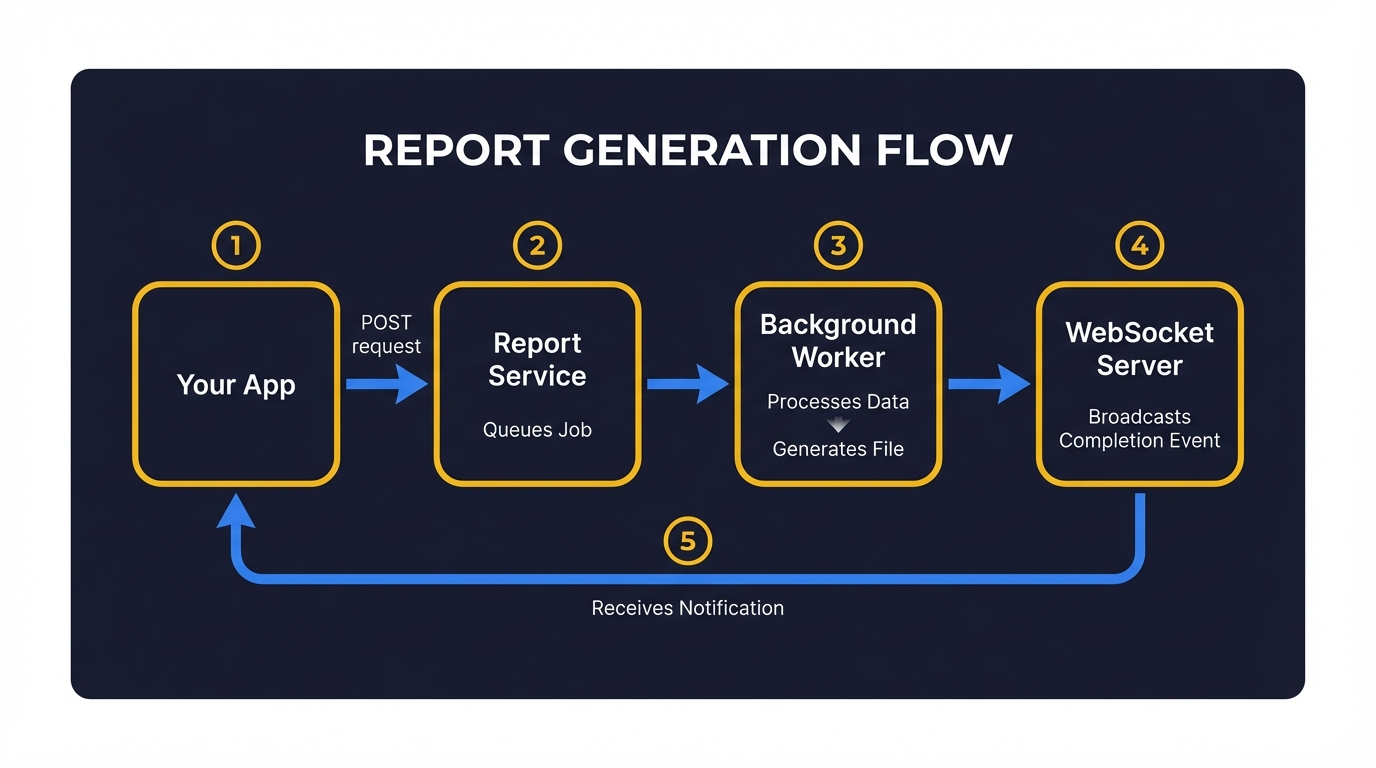
Step-by-Step Flow
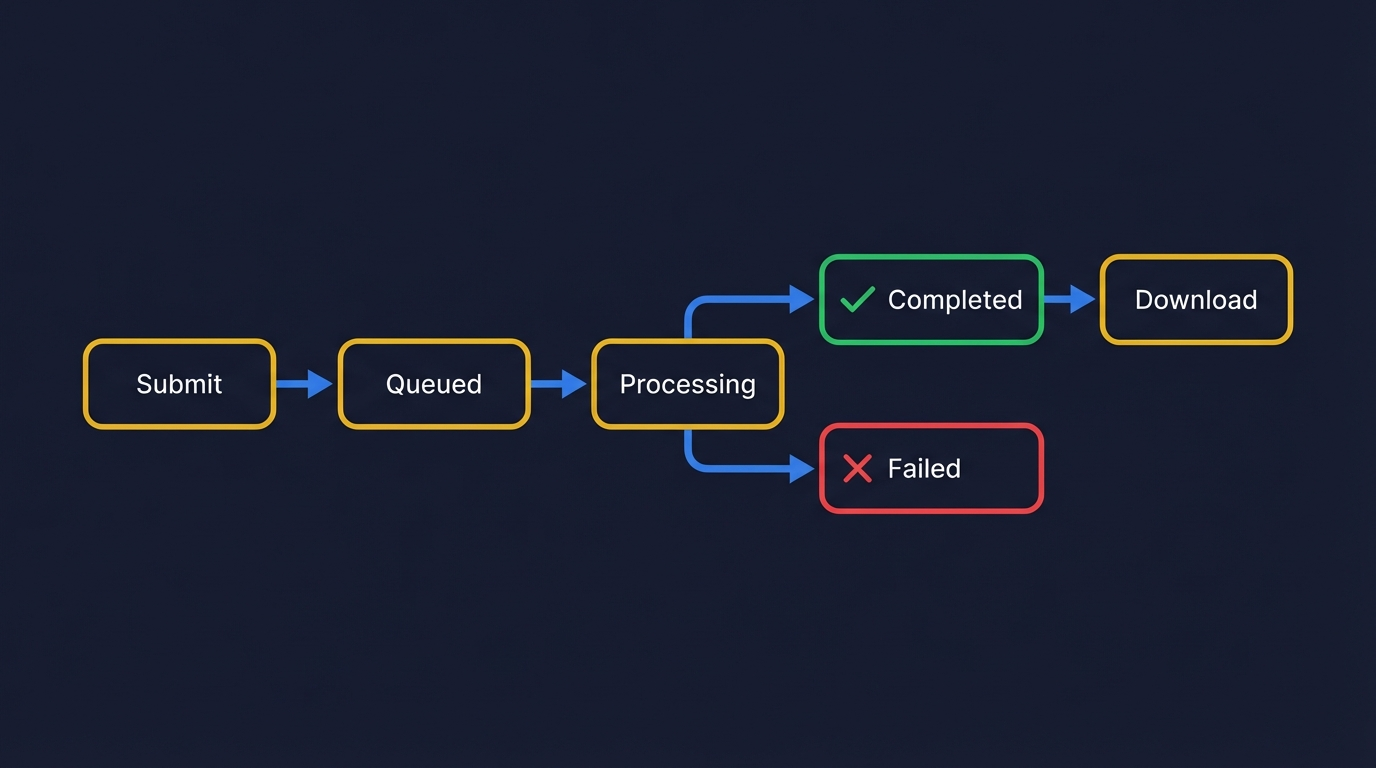
Reports are processed by background workers. Small reports may complete in seconds; larger ones (30 days of trail data) can take up to a minute.
Base URLs
| Service | URL | Purpose |
|---|---|---|
| REST API | https://reporting.yipii.io | Submit requests, check status, download |
| WebSocket | wss://ws-reporting.yipii.io | Real-time completion notifications |
Authentication
The Reporting Service uses the same OAuth2 Bearer token as the IoT API. Obtain a token via the Authentication guide, then include it in all requests:
Step 1: Submit a Report Request
Endpoint
Parameters
| Parameter | Type | Required | Description |
|---|---|---|---|
type | string | Yes | Report type (see Report Types below) |
format | string | Yes | Output format: json, pdf, excel, or html |
asset_id | integer | Yes* | Asset ID to report on |
asset_ids | integer[] | No | Multiple asset IDs (for mileage reports) |
beacon_id | integer | No | Beacon ID (for beacon reports) |
driver_id | integer | No | Driver/employee ID |
date_from | string | Yes | Start date (ISO 8601, e.g. 2026-01-01) |
date_to | string | Yes | End date (ISO 8601, e.g. 2026-01-31) |
account_name | string | No | Account key (used for WebSocket channel routing) |
title | string | No | Custom report title |
priority | string | No | low, standard (default), or high |
*asset_id is required for most report types. Beacon reports can use beacon_id instead.
JavaScript
cURL
Python
Response (HTTP 201)
If an identical report was recently generated, the service returns it from cache immediately (HTTP 200) with "source": "cache" in the response.
Step 2: Connect to WebSocket
The Reporting Service broadcasts events via a Pusher-compatible WebSocket server. You can use any Pusher client library.
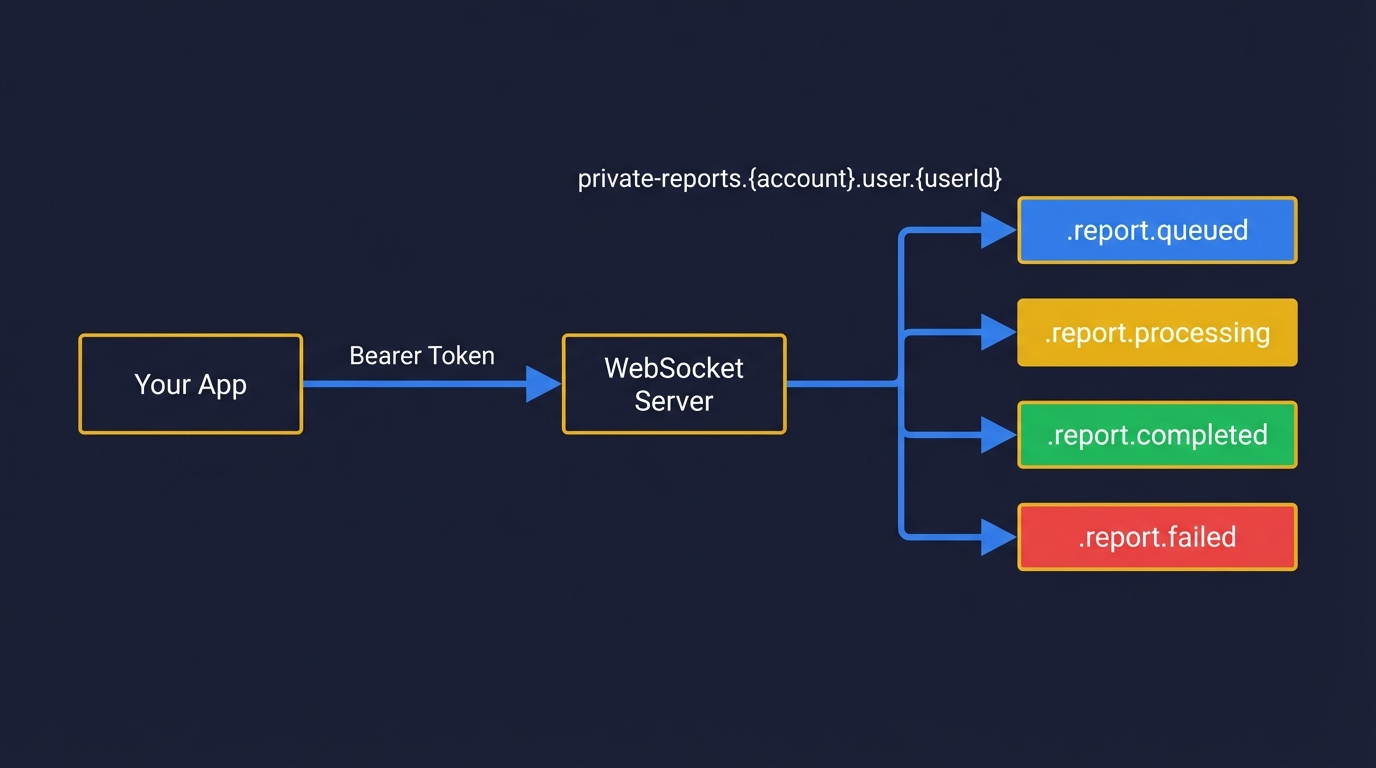
Channel Format
For example, user 42 on account acme-fleet subscribes to:
Broadcasting Auth
Private channels require authentication. The client library handles this automatically by calling the auth endpoint when subscribing:
With body:
The auth endpoint validates your Bearer token and returns a signature the WebSocket server uses to authorize the subscription.
JavaScript (Pusher JS)
Python (pysher)
Step 3: Listen for Events
Once subscribed, listen for these events on the channel:
Events
| Event | Description |
|---|---|
.report.queued | Report entered the processing queue |
.report.processing | Worker started generating the report |
.report.completed | Report is ready for download |
.report.failed | Report generation failed |
Note the leading dot (.) — this is required by the server's event naming convention.
Completed Event Payload
Failed Event Payload
JavaScript Event Handlers
Step 4: Download the Report
Once you receive a .report.completed event, fetch the result.
For PDF, Excel, HTML
Request a signed download URL:
Response
The download_url is a pre-signed URL valid for 1 hour. Use it to download the file directly.
For JSON Format
Request the report data:
When the report is completed and the format is json, the status endpoint returns the data inline. Alternatively, use the download endpoint which returns the JSON content directly.
JavaScript
cURL
Polling Fallback
If you can't use WebSocket (server-side scripts, restricted environments), poll the status endpoint instead:
Response
JavaScript (Polling)
cURL (Polling)
Complete Example
End-to-end JavaScript example using WebSocket with polling fallback:
Report Types
| Type | Description | Max Date Range |
|---|---|---|
trail | GPS position history with speed, ignition, movement | 30 days |
trip | Trip summaries with start/end locations, distance, duration | 30 days |
driver_behavior | Harsh braking, acceleration, cornering events | 30 days |
driver_score | Driver performance scoring | 30 days |
sensor | Temperature, fuel level, and other sensor data | 30 days |
fuel | Fuel consumption analysis | 30 days |
alarms_data | Alert and alarm history | 30 days |
obd_data | OBD-II vehicle diagnostics | 14 days |
beacon_environment | Bluetooth beacon detection events | 14 days |
portable_beacon | Portable beacon tracking (requires beacon_id) | 14 days |
mileage_daily | Mileage aggregated by day | 30 days |
mileage_weekly | Mileage aggregated by week | 90 days |
mileage_monthly | Mileage aggregated by month | 365 days |
mileage_comparison | Period-over-period mileage comparison | 365 days |
Output Formats
| Format | Content Type | Description |
|---|---|---|
json | application/json | Raw data returned directly |
pdf | application/pdf | Formatted PDF document |
excel | application/vnd.openxmlformats-officedocument.spreadsheetml.sheet | Excel spreadsheet |
html | text/html | HTML report |
For json format, the data is returned directly in the response. For all other formats, you receive a pre-signed download URL valid for 1 hour.
Rate Limits and Constraints
| Constraint | Value |
|---|---|
| Max concurrent reports per user | 3 |
| Queue timeout | 10 minutes |
| Date range exceeding type max | Returns 400 error |
| Download URL validity | 1 hour |
Error Handling
Common Error Responses
400 — Validation Error
401 — Authentication Failed
403 — Access Denied
429 — Rate Limited
503 — Service Degraded
When the queue is overloaded, the service enters degraded mode and rejects new requests temporarily:
Next Steps
- Reporting Demo — Interactive sandbox with simulated report flow
- Reporting API Reference — Interactive endpoint documentation
- Live Tracking & WebSocket — Real-time location streaming
- IoT-BE API Reference — Asset and tracker endpoints
- Authentication — OAuth2 token setup
Was this page helpful?