

Recalls
Track manufacturer safety recalls, identify affected fleet assets, and drive remediation to completion
Recalls
The Recalls feature lets you track manufacturer safety recalls that affect your fleet, identify which assets are impacted by each recall, and drive remediation to completion across every vehicle. Record campaign details once, match assets automatically by VIN, make, model, or year, and never miss a safety-critical repair.
Accessing Recalls
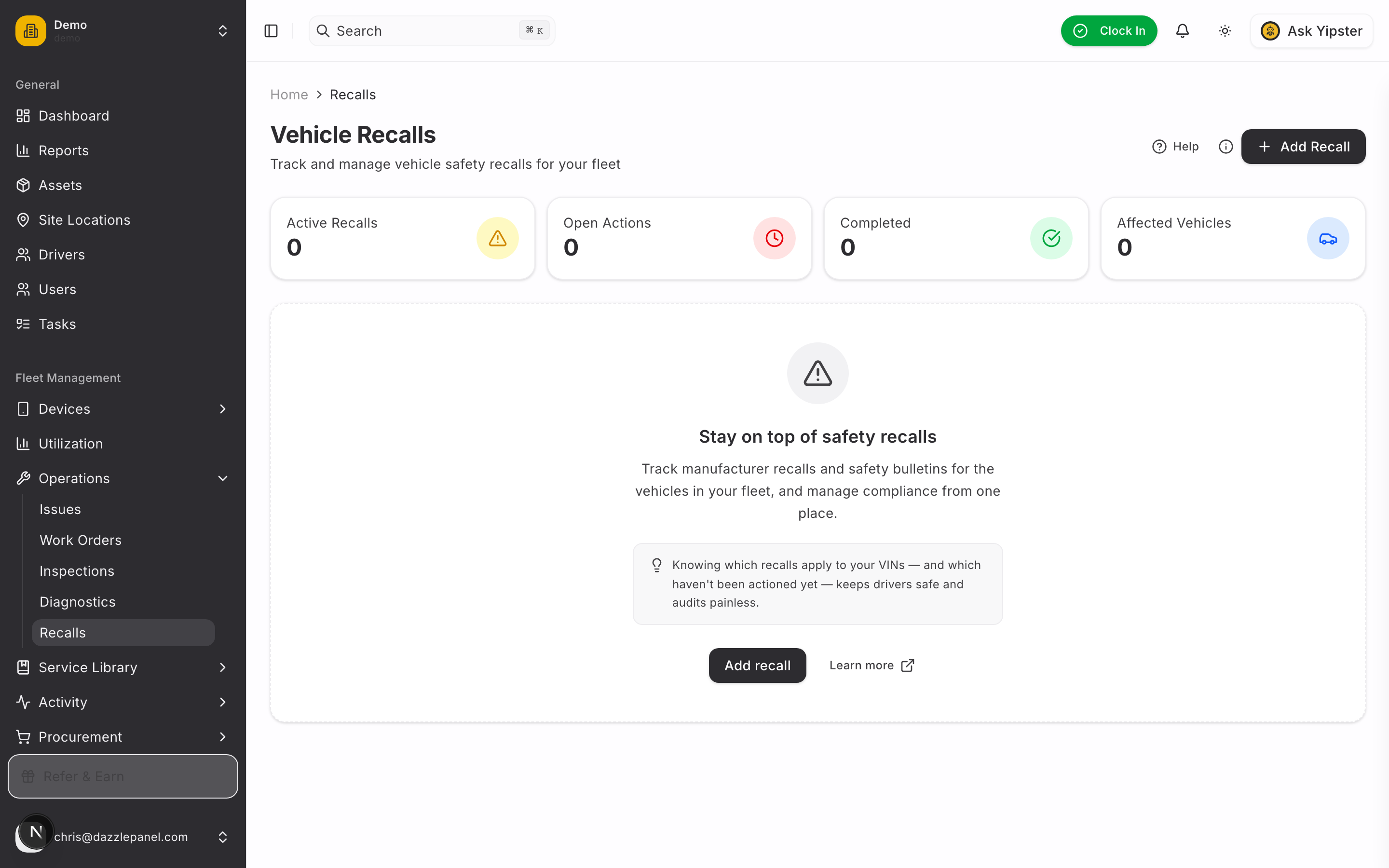
Navigate to Fleet Management > Operations > Recalls in the sidebar. The recalls page shows summary stats, a searchable data table, and quick access to affected-asset tracking.
List View
The main recalls page shows:
| Column | Description |
|---|---|
| Campaign ID | Manufacturer's recall ID, for example "23V-123" |
| Manufacturer | The vehicle manufacturer who issued the recall |
| Title | Short description of the recall |
| Component | The part or system affected |
| Severity | Low, Medium, High, or Critical |
| Status | Active, In Progress, Closed, or Superseded |
Filtering and Search
- Search -- Find recalls by campaign ID, manufacturer, or title
- Filter by Status -- Active, In Progress, Closed, or Superseded
- Filter by Severity -- Low, Medium, High, or Critical
- Export CSV -- Download the recalls list as a CSV file
- Refresh -- Reload the latest data
Stats Cards
Four summary cards give you an at-a-glance view of recall exposure:
- Active Recalls -- Recalls with an Active or In Progress status
- Open Actions -- Asset-level recall actions that have not yet been addressed
- Completed -- Asset-level recall actions that have been resolved
- Affected Vehicles -- Unique vehicles linked to at least one recall
Creating a Recall
Click Add Recall to open the tabbed form.
Tab 1: Identification
Capture who issued the recall and what it is:
- Campaign ID (text) -- The manufacturer's or NHTSA's recall identifier, for example "23V-123"
- Manufacturer (text, required) -- The vehicle manufacturer, for example "Ford" or "Toyota"
- Title (text, required) -- Short description of the recall, for example "Brake master cylinder may leak"
Tab 2: Component
Describe what's broken and how it's fixed:
- Component (text) -- The specific part or system affected, for example "Brake master cylinder"
- Component Category (text) -- The broader category, for example "Brakes", "Airbags", "Fuel System", "Electrical", or "Powertrain"
- Consequence (textarea) -- What could go wrong if the recall is not addressed, for example "Loss of braking ability may increase risk of a crash"
- Remedy (textarea) -- How the manufacturer will fix the issue, for example "Dealer will replace the master cylinder free of charge"
Tab 3: Details
Timing, source, and triage:
- Recall Date -- When the recall was formally issued
- Notification Date -- When you (or the owner of record) were notified
- Remedy Available Date -- When the fix became available from dealerships
- Source (select) -- How the recall entered the system:
- Manual -- Entered by a user
- NHTSA -- Imported from the US National Highway Traffic Safety Administration
- Manufacturer -- Received directly from the manufacturer
- Source URL (optional) -- Link to the official recall notice for quick reference
- Severity (select) -- Low, Medium, High, or Critical (defaults to Medium)
- Status (select) -- Active, In Progress, Closed, or Superseded (defaults to Active)
- Notes (textarea) -- Internal notes for your team
Click Create Recall to save.
Recall Severity
| Severity | Description |
|---|---|
| Low | Minor issue with limited safety impact |
| Medium | Moderate issue that should be addressed in a reasonable timeframe |
| High | Significant safety concern requiring prompt action |
| Critical | Severe safety risk requiring immediate action -- consider grounding affected assets until fixed |
Recall Status
| Status | Meaning |
|---|---|
| Active | The recall is current and remediation has not started |
| In Progress | At least one affected asset is being repaired |
| Closed | Every affected asset has been remediated or marked Not Applicable |
| Superseded | A newer recall has replaced this one |
Recall Detail Page
Click any recall in the list to open its detail page. The page includes a summary sidebar and tabbed content.
Summary Sidebar
At a glance:
- Manufacturer and Campaign ID
- Status and severity badges
- Affected component and category
- Recall date and remedy available date
- Link to the official source (if a Source URL was provided)
Overview Tab
- Completion Progress -- Progress bar showing how many affected assets have been remediated, with counts for total affected, open, and completed
- Consequence -- Full description of the safety risk
- Remedy -- How the fix will be applied and when it became available
- Notes -- Any internal notes attached to the recall
Affected Assets Tab
Lists every fleet asset linked to the recall. Each asset-level record tracks its own status:
| Status | Meaning |
|---|---|
| Pending | The asset is affected but no action has been taken |
| Scheduled | A repair appointment has been booked |
| In Progress | The repair is underway |
| Completed | The recall has been resolved for this asset |
| Not Applicable | Investigation showed the asset is not affected |
For each affected asset you can track:
- Scheduled appointment date
- Completion date
- Linked work order
- Repair cost and whether it was covered by warranty
- Dealership or vendor performing the repair
- Completion notes
Affected Assets
Linking assets to a recall is how you drive remediation. There are three ways to match assets:
- By VIN -- Exact match against recalls that list specific VIN ranges (most accurate)
- By Make, Model, Year -- Matches every fleet asset in the affected range
- Manual linking -- Add specific assets to a recall by hand
Affected-asset records appear in the Affected Assets tab of the recall detail page and also on each asset's own profile under a Recalls section, so mechanics and fleet managers see the flag in context.
NHTSA Integration
Future -- US recalls can be imported automatically by VIN, make, or model from NHTSA's public API. When enabled, new recalls matching your fleet will appear in the system with affected assets pre-linked. Contact support for early access.
Remediation Workflow
The end-to-end process for handling a recall:
- Identify affected assets -- by VIN (preferred) or make/model/year. Review the Affected Assets tab for accuracy and remove any Not Applicable assets.
- Contact the dealership -- use the recall's Remedy description to understand what the dealer will do. Book appointments.
- Create work orders -- one per affected asset, linked back to the recall. The work order tracks scheduled date, repair cost, and warranty status.
- Track repair completion -- update each asset-level record to Scheduled, In Progress, then Completed as work progresses.
- Mark per-asset remediation complete -- capture completion date, dealership, and any notes or evidence.
- Close the recall -- once every affected asset is Completed or Not Applicable, the recall can be moved to Closed.
Dashboard Indicators
Recalls surface across the product so you can't miss them:
- Main dashboard -- Active recalls appear in a Recalls widget with affected-asset counts
- Severity badges -- Critical and High recalls are highlighted with red and orange indicators
- Per-asset flag -- Affected assets display a recall badge on their profile until remediation is Completed
- Progress bar -- Each recall's detail page shows a completion bar -- at a glance you see how much work is left
Permissions
| Role | Permissions |
|---|---|
| Admin | Full CRUD -- create, view, edit, delete any recall |
| Fleet Manager | Full CRUD -- create, view, edit, delete any recall |
| Office Staff | Create and update recalls |
| Mechanic | View recalls; update status when completing repairs |
| Inspector | View recalls |
| Driver | View recalls on assets they are assigned to |
| Reports Only | View recalls |
Best Practices
- Check for new manufacturer recalls regularly -- NHTSA publishes campaigns weekly
- Use the official Campaign ID so your records match the manufacturer's and NHTSA's
- Set severity aggressively -- Brakes, airbags, steering, and fuel systems are almost always High or Critical
- Include a Source URL pointing to the official notice for quick reference
- Link a work order to every affected asset so repair costs are tracked
- Track dealership and cost on each asset-level record -- useful for insurance, reimbursement, and budgeting
- Close recalls only after every affected asset is Completed or Not Applicable
- Review the completion progress bar weekly to surface stalled repairs
- For Critical recalls, consider grounding affected assets until the repair is complete
FAQ
How do I know which recalls affect my fleet? Today, you enter recalls manually from manufacturer notices and NHTSA campaigns, then match affected assets by VIN or make/model/year. NHTSA auto-import is on the roadmap and will pre-link your fleet automatically.
What's the difference between Closed and Superseded? Closed means every affected asset has been remediated. Superseded means the recall has been replaced by a newer, usually broader, recall from the same manufacturer. Superseded recalls stay in the system for history; the new recall drives remediation.
What if an asset is in the affected range but turns out not to need the repair? Mark the asset-level record as Not Applicable with a note explaining why (for example, "Dealer inspection confirmed no defect"). It still counts toward the completion bar, so the recall can be closed.
Can I track the cost of recall repairs across the fleet? Yes. Each asset-level record tracks repair cost and whether it was warranty-covered. Sum across recalls in the dashboard or export the recalls list to CSV for analysis.
How do I handle a recall that only affects certain VINs in a model year? Enter the recall manually and link only the affected VINs to it. Leave other assets of the same make/model/year alone. Accurate VIN matching is the safest approach.
Are drivers notified about recalls on their assigned vehicles? Drivers see recall badges on their assigned assets in the mobile app. They are not notified by email by default -- recall notifications are designed for Fleet Managers and Office Staff who can schedule the repairs.
Can I link a work order to a recall? Yes. Create the work order as usual, then link it to the asset-level recall record. Repair cost and warranty coverage from the work order flow back into the recall.
What happens when I close a recall -- can I still see it? Yes. Closed recalls stay in the system permanently. Use the status filter to hide them from the default view, or flip the filter to review historical recalls.
Related Links
- Warranties -- Check warranty coverage for recall repairs
- Work Orders -- Create work orders to track recall repair work
- Documents -- Attach official recall notices and repair documentation
- Licenses -- Track driver licences and operating permits
- Managing Assets -- View recalls affecting specific assets
- Automations -- Build custom recall-related notification rules